Sunday, 18 May 2025

Terrible video curriculum, Good video

TERRIBLE VIDEO!!!! 
LET'S SEE HOW WE MUST NOT DO IT!


THIS IS A GOOD ONE.


When you prepare your video, make sure that it is something you are proud to show to anyone.

Wednesday, 1 June 2022

JOB INTERVIEWS. TYPICAL QUESTIONS


TYPICAL QUESTIONS AT A JOB INTERVIEW (and a few ideas for the best answers)

1.How would you describe yourself?
a.Well, I consider myself as a responsible person, …

2.What are your goals in life?

3.Describe your ideal job.

4.What influenced you to choose this career?

a.Well, I like sports very much and I like teaching…
5.How would you describe yourself in terms of your ability to work as a member of a team?

a.I practice some team sports, like football, basketball, and I know the importance of working together to get the best results, so I think I can be a good team player for this company.

6.What is your greatest motivation?

a.I like doing things well and get the recognition of the people I work with.

7.Why do you want to join us? Why do you want to work for this organization?

8.What experience do you have in this field?

9.What do you expect to be doing in ten years?
 a.Well, this questions is not easy to answer…

10.Do you have a geographic preference?

11.Tell me about the salary  you are seeking.
 a.As stipulated in the salary agreement (convenio salarial).
b.Well, iT depends on the contract, but if I had to say a figure (cifra), I would say between 700 and 900 euros.
12.What is more important to you, the money or the work?

13.Are you willing to work overtime? Nights? Weekends?

 a.I don’t have family responsibilities, so at present I don’t have problems to work overtime, so I can have more experience.
14.Do you have any questions for me?


the GOOD and the BAD
DOs and DONT'S

VIDEO CURRICULUM RUBRIC


VIDEO CURRICULUM RUBRIC


EXCELLENT 
(9--10)
VERY GOOD
(7-8)
ACCEPTABLE
(5-6)
POOR
(4 or less)
Content
rellevant ideas, gives a general view of his/her personal qualifications, education and skills.
The vocabulary is advanced, with technical word related to the topic in question. The grammar is advanced ( great variety of verbal tenses, conditional tenses) , with subordinate clauses, using connectors to express the ideas. (On the one hand, moreover, in relation to my experience…)
gives good ideas and information about her/his education, and personal skills.
The vocabulary is specific to the topic.
The grammar is good ( present simple, progressive, past simple, future, conditional), using some connectors to link the ideas.
covers basic information of the students.
The vocabulary and grammar is basic, general ( present simple, present progressive, past simple).
The speaker uses some basic connectors (and, also, too).
some important information is not given in the video.
The speaker does not use connectors, just sentences, to express his/her ideas.
Pronunciation
the message is clear, with great pronunciation, intonation, fluent. The message sounds natural, there are no mistakes.
the speaker does not read the message, but delivers it naturally, following some points and planning.
the speaker uses good vocabulary, good intonation and fluency. The message sounds natural. The speaker uses written notes just to guide the presentation.
the speaker uses basic vocabulary, with acceptable pronunciation. there is some Spanish interference.
The speaker reads a bit when delivering the message.
the sound is not good, it is difficult to understand the message; there are lots of mother tongue interferences.
The speaker reads all the message.
Format
the image is clear, there are some relevant titles, the video is edited to improve the presentation. It looks professional and elegant.
The duration is between 1 and 2 minutes.
the video has been edited, with good sound, the image is good and professional.
The duration is between 1 and 2 minutes max.
The duration is 1 or 2 minutes.
Some basic edition.
The video has not been edited, the image is not clear; the duration is too short or too long.


Wednesday, 4 May 2022

Helpdesk. The truth of helplines.


Useful expressions. https://www.helponclick.com/blog/21-phrases-that-service-staff-must-know/
In pairs, invent a short dialogue in which a client calls to ask for a problem about his/her computer. Use the expressions provided


Listening practice: fill in the gaps. Technical support.

1.- https://www.eslfast.com/robot/topics/dailylife/dailylife08.htm

Listein to the 3 situations. What is the problem?

  1. the computer is making noises
  2. the computer does not turn on
  3. the computer is frozen
What could be the problem?
    a) The cables 
     b)The hard drive
     c) There is no electricity
      d) the CPU


  2.- https://www.esl-lab.com/intermediate/computer-sales-script/

1.- Listen to the conversation and answer:
A) What security issue does the caller mention?

Thursday, 17 March 2022

an interesting ppt

this is good for revising basic vocabulary.
SPREADSHEETS POWER POINT

and a video on DATABASES:
DATABASES VIDEO.  
You can read the transcript at the same time that you listen to the video.

You can practise the vocabulary at these sites:
EXCEL

Wednesday, 15 December 2021

Learning about the present perfect tense

basic structure:


game: how long?

 https://www.cristinacabal.com/?p=14336


Have you ever...?


  • Have you ever skipped school?
  • Have you ever fallen asleep in the cinema?
  • Have you ever been to a nude beach?
  • Have you ever done something you regret?
  • Have you ever read a whole Harry Potter book?
  • Have you ever drunk while underage?
  • Have you ever had an accident?
  • Have you ever kissed someone on the first date?
  • Have you ever read the Bible?
  • Have you ever aced a test without studying?
  • Have you ever passed out?
  • Have you ever slept until 5 pm?
  • Have you ever eaten food that fell on the floor?
  • Have you ever tried to cut your own hair?
  • Have you ever lied to get a job?
  • Have you ever regifted something that was gifted to you?
  • have you ever given a stranger a fake phone number?
  • Have you ever met someone famous?

Wednesday, 3 November 2021

PAST SIMPLE


Resultado de imagen de simple past


  1. Ayer no terminamos la copia de seguridad.
  2. La semana pasada formateamos todos los equipos de la oficina.
  3. ¿Comprobaste que la impresora estaba conectada al ordenador?
  4. ¿Hiciste copia de seguridad de todos tus documentos e imágenes?
  5. ¿Enviaste el correo hace dos días?
  6. El año pasado creamos un programa para las empresas de la isla.
  7. Nuestra empresa no pagó las licencias.
  8. Nosotros no recibimos ningún mensaje ayer.

Women in computers.

READING: https://www.usingenglish.com/comprehension/30.html


Ada Lovelace
   

http://www.imdb.com/video/screenplay/vi3893036825/

(From Wikipedia)
Augusta Ada King, Countess of Lovelace (10 December 1815 – 27 November 1852), born Augusta Ada Byron, was an English writer chiefly known for her work on Charles Babbage's early mechanical general-purpose computer, the analytical engine. Her notes on the engine include what is recognised as the first algorithm intended to be processed by a machine; as such she is regarded as the world's first computer programmer.[1][2]
She was the only legitimate child of the poet Lord Byron (with Anne Isabella Milbanke), but had no relationship with her father, who died when she was nine. As a young adult she took an interest in mathematics, and in particular Babbage's work on the analytical engine

Wednesday, 13 October 2021

LISTENING PRACTICE hardware and software unit 1

In the following page, you will practice specitfic vocabulary.

Do the listenings and answer the questions.


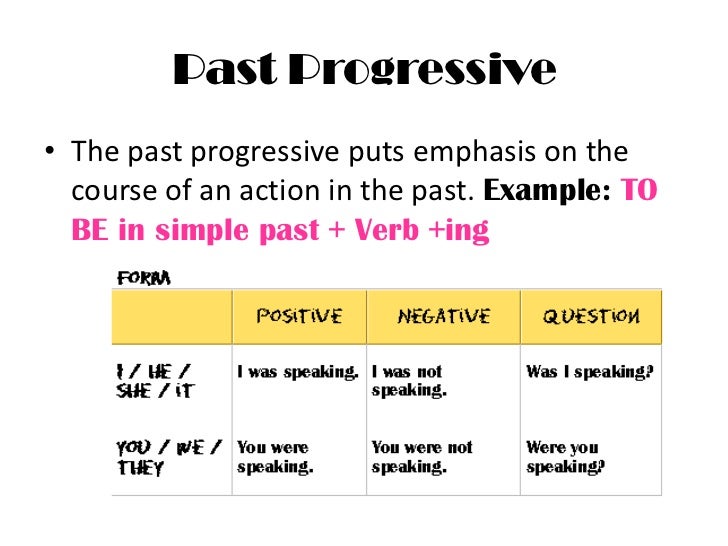
Present simple / Present Progressive


LOOK AT THE EXAMPLES:

PRESENT SIMPLE

We open the shop at 10:00


We don’t open on Sundays


Do you open on Saturdays afternoon?

Worten opens at 10:00 and closes at 9:30.

Worten doesn't open on Sunday.

Does Worten open on Saturday afternoon?

We format your computer in just one hour.


PRESENT CONTINUOUS

This week, we are opening at 9;30, (only this week).

I am scanning my computer for viruses.


Right now, we are formatting your computer.

 (we are still doing it)


Are you listening to me?

(future meaning: I'm visiting a Pc store next Friday


(from: http://rosaliascorner.blogspot.com/2018/02/who-wants-to-be-millionaire-tenses.html)

Translate into English:

Te arreglamos el ordenador en menos de una hora. (verb: fix)
Compramos tu ordenador viejo y te lo cambiamos por uno nuevo. (buy)
Estamos actualizando el sistema operativo. (update)
El ordenador está iniciándose. (start/ boot)
El ordenador no hace ruido. (normalmente) (make noise)
El ordenador está haciendo un ruido raro.
El ordenador no arranca.
El dispositivo almacena datos. (store)
Las supercomputadoras procesan millones de datos. (process)
El ordenador está procesando la información.
Sam trabaja como Administrador de Base de datos. (work)
Sam está trabajando duro en nuestra compañía


Wednesday, 29 September 2021

What type of computer have you got?

Understanding computer specs


1.       The computer brain is the ___________________
2.       The speed of the processor is measured in ______________
3.       The more gigahertz, the___________________________
4.       What is a multi-core PC?__________________________
5.       What do you need good graphics for?___________________


TASK: TELL YOUR PARTNER WHAT COMPUTER HAVE YOU GOT.


http://www.pcworld.co.uk/gbuk/computing/desktop-pcs/desktop-pcs/1093_8225_71255_xx_xx/xx-criteria.html

What is a computer?


Visit the following link, watch the video and do the following activities:

WHAT IS A COMPUTER?
QUESTIONS TOPIC 2: WHAT IS A COMPUTER?
1. What are the THREE basic uses of a computer?
2. What are the two basic parts of a computer?
3. Mention the different types of computer and indicate their most important advantages.
4. What are the three operating systems that there exist today?
5. Find a picture with the names of the different parts that we can find in a computer.

Basic parts of a computer


VOCABULARY AND PRONUNTIATION.
Visit the following site and practise the pronuntiation of the words.

VOCABULARY

6. FINAL ORAL ACTIVITY: describe a computer. Indicate its different parts.

VOCABULARY QUIZ.EXTRA ACTIVITY.
10 QUESTION QUIZ
https://www.proprofs.com/quiz-school/story.php?title=inside-computer-hardware
MORE ACTIVITIES


https://www.listenaminute.com/c/computers.html

Types of computer


https://www.tutorialspoint.com/computer_fundamentals/computer_types.htm